About bismark m16
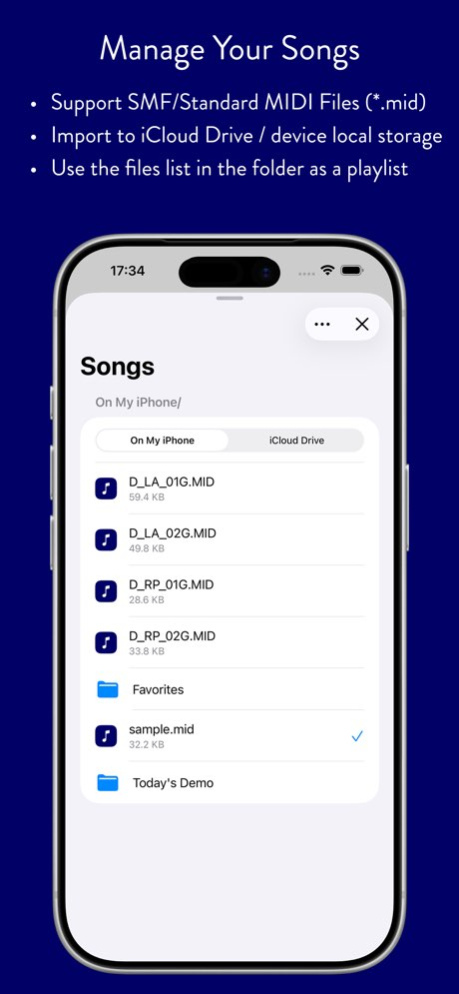
bismark m16 is a MIDI player app that loads SMF (Standard MIDI File) for the GM (General MIDI) specification as Song files. Song files are managed in the "m16" folder of your iCloud Drive and kept in sync across all your...
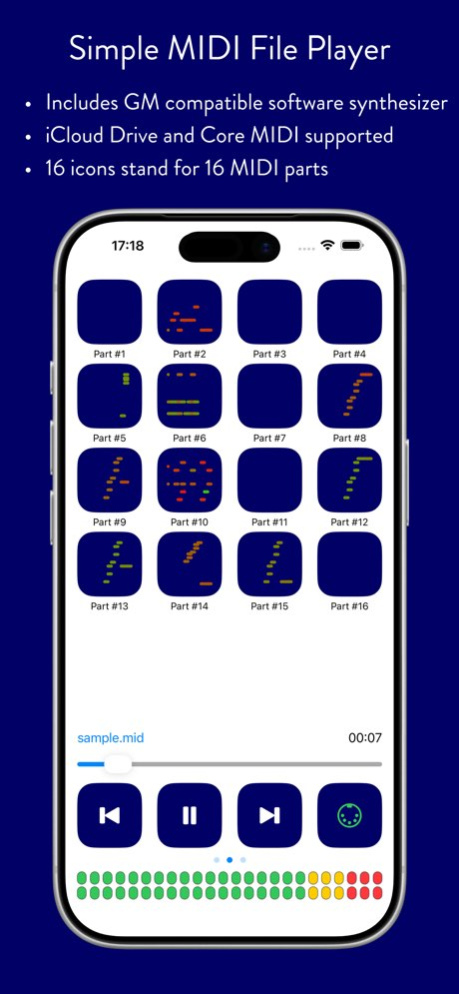
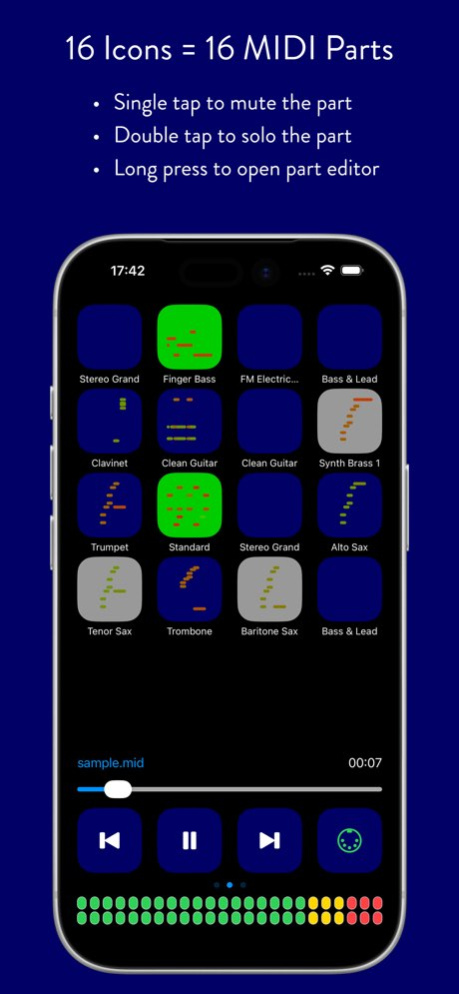
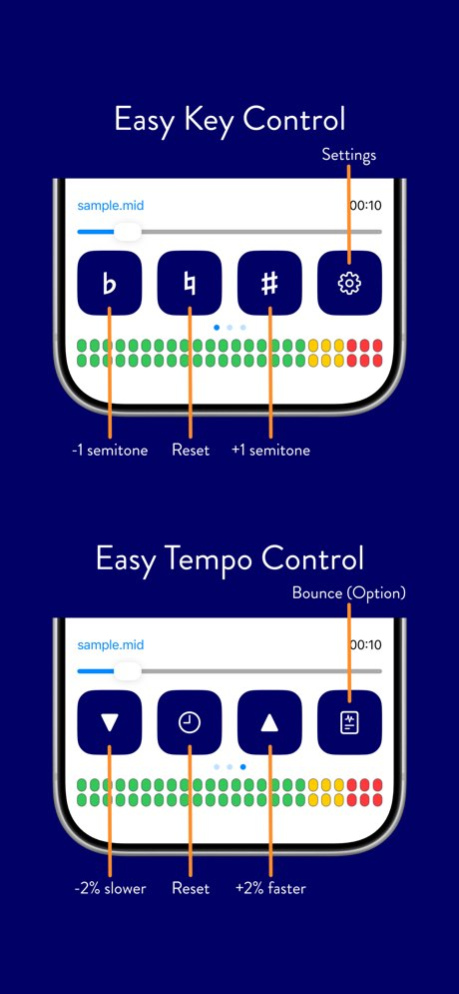
bismark m16 is a MIDI player app that loads SMF (Standard MIDI File) for the GM (General MIDI) specification as Song files. Song files are managed in the "m16" folder of your iCloud Drive and kept in sync across all your iOS / iPadOS devices. You can also bring MIDI files in directly from other apps using "Open in m16" or the Files app. 16 icons across the top of the main screen represent the 16 MIDI channels. Tap once or twice on an icon to mute or solo that channel. Long-press an icon to open the Part editor, where you can adjust volume, pan, reverb send, chorus send and delay send, and choose the instrument for each part. During playback, the icons show live performance information in piano roll, circle or MIDI analyzer view. Along the bottom of the screen are transport buttons and a slider for play/stop, seeking the song position, and changing key and tempo. Now Playing information - including elapsed time and playback state - is also shown on the Lock Screen and in Control Center. m16 supports background MIDI playback, so you can play along on your favorite instrument app while m16 plays the backing track behind it. m16's built-in synthesizer plays through the GeneralUser GS SoundFont. If you'd rather use your own gear, m16 can send its output over CoreMIDI, or Bluetooth MIDI to external modules and other Virtual MIDI compatible apps - and can even hand off playback entirely to bismark's companion synthesizer app, bs-16i, for a wider range of instrument sounds.
Previous Versions
Here you can find the changelog of bismark m16 since it was posted on our website on 2023-09-25 11:08:23.
The latest version is 5.0.1 and it was updated on 2026-10-13 13:42:31. See below the changes in each version.
bismark m16 version 5.0.1
Updated At: 2026-10-13
Changes: Version History Avoid noise on some devices with iOS 27 5.0.1 Sep 15 * Apply Hi-Res version of Synthesizer engine (floating point model)
* Reimplement whole UI to optimize for latest OS versions
* Now iCloud Drive and local storage can be selected for each case.
* Now Song files in iCloud Drive are automatically downloaded to your device when they are required.
* Add Bounce feature as an In-App Purchase option 5.0.0 Aug 31 A possible fix for the issue that imported files were not shown. 4.7.4 04/20/2025 Improved app performance. 4.7.3 06/25/2024 ・Possible fixes and improvements around file-browsing 4.7.2 06/18/2024 ・Fix "iCloud Drive" file management issue on the latest OS versions 4.7.1 05/04/2024 ・Support latest OS versions 4.7 11/26/2023 * Improve UI Layout
* Fix that instruments might be reset on rewind to the top of the song
* Add `Songs > Download All`
* Possible crash workaround (Version 4.5.2) 4.5.2 03/12/2022 * Improve UI Layout
* Fix that instruments might be reset on rewind to the top of the song
* Add `Songs > Download All` 4.5 02/27/2022 Fix adding/removing CoreMIDI device might be not recognized 4.2 04/11/2021 Fix the minor issue 4.1.2 03/19/2021 Fix the minor issue 4.1.1 03/14/2021 Support latest iOS versions 4.1 03/12/2021 Improve CoreMIDI driver management 4.0.6 08/11/2020 ・Now all Song files are managed in “m16” folder of your iCloud Drive, and synced between all iOS / iPadOS devices.
・Support latest iOS / iPadOS versions (Dark mode partly supported)
・Version 4.0.2 - For uses who do not want to use iCloud Drive, allow to use the previous sandbox that compatible with version 3.x for managing files. Please note that this workaround is enabled only if you disable iCloud Drive option on your device. Once iCloud Drive is enabled, files are moved to iCloud Drive. There is no feature to revert files to the previous place. 4.0.4 05/21/2020 ・Now all Song files are managed in “m16” folder of your iCloud Drive, and synced between all iOS / iPadOS devices.
・Support latest iOS / iPadOS versions (Dark mode partly supported)
・Version 4.0.2 - For uses who do not want to use iCloud Drive, allow to use the previous sandbox that compatible with version 3.x for managing files. Please note that this workaround is enabled only if you disable iCloud Drive option on your device. Once iCloud Drive is enabled, files are moved to iCloud Drive. There is no feature to revert files to the previous place. 4.0.3 05/19/2020 ・Now all Song files are managed in “m16” folder of your iCloud Drive, and synced between all iOS / iPadOS devices.
・Support latest iOS / iPadOS versions (Dark mode partly supported)
・Version 4.0.2 - For uses who do not want to use iCloud Drive, allow to use the previous sandbox that compatible with version 3.x for managing files. Please note that this workaround is enabled only if you disable iCloud Drive option on your device. Once iCloud Drive is enabled, files are moved to iCloud Drive. There is no feature to revert files to the previous place. 4.0.2 05/18/2020 ・Now all Song files are managed in “m16” folder of your iCloud Drive, and synced between all iOS / iPadOS devices.
・Support latest iOS / iPadOS versions (Dark mode partly supported) 4.0 05/16/2020 - Improve seek and time counter display
- On importing from iCloud, multiple files can be selected.
- Multiple file selection can only be used with iOS 11 and iCloud Drive
- Fix some stability issues 3.2 06/12/2018 - Add workaround for avoiding crash or audio buffer error related with other audio apps 3.1.2 03/02/2018 - Fix minor issues 3.1.1 02/07/2018 3.1 02/06/2018
bismark m16 version 5.0.1
Updated At: 2026-09-18
Changes: Version History Avoid noise on some devices with iOS 27 5.0.1 2d ago * Apply Hi-Res version of Synthesizer engine (floating point model)
* Reimplement whole UI to optimize for latest OS versions
* Now iCloud Drive and local storage can be selected for each case.
* Now Song files in iCloud Drive are automatically downloaded to your device when they are required.
* Add Bounce feature as an In-App Purchase option 5.0.0 Aug 31 A possible fix for the issue that imported files were not shown. 4.7.4 04/20/2025 Improved app performance. 4.7.3 06/25/2024 ・Possible fixes and improvements around file-browsing 4.7.2 06/18/2024 ・Fix "iCloud Drive" file management issue on the latest OS versions 4.7.1 05/04/2024 ・Support latest OS versions 4.7 11/26/2023 * Improve UI Layout
* Fix that instruments might be reset on rewind to the top of the song
* Add `Songs > Download All`
* Possible crash workaround (Version 4.5.2) 4.5.2 03/12/2022 * Improve UI Layout
* Fix that instruments might be reset on rewind to the top of the song
* Add `Songs > Download All` 4.5 02/27/2022 Fix adding/removing CoreMIDI device might be not recognized 4.2 04/11/2021 Fix the minor issue 4.1.2 03/19/2021 Fix the minor issue 4.1.1 03/14/2021 Support latest iOS versions 4.1 03/12/2021 Improve CoreMIDI driver management 4.0.6 08/11/2020 ・Now all Song files are managed in “m16” folder of your iCloud Drive, and synced between all iOS / iPadOS devices.
・Support latest iOS / iPadOS versions (Dark mode partly supported)
・Version 4.0.2 - For uses who do not want to use iCloud Drive, allow to use the previous sandbox that compatible with version 3.x for managing files. Please note that this workaround is enabled only if you disable iCloud Drive option on your device. Once iCloud Drive is enabled, files are moved to iCloud Drive. There is no feature to revert files to the previous place. 4.0.4 05/21/2020 ・Now all Song files are managed in “m16” folder of your iCloud Drive, and synced between all iOS / iPadOS devices.
・Support latest iOS / iPadOS versions (Dark mode partly supported)
・Version 4.0.2 - For uses who do not want to use iCloud Drive, allow to use the previous sandbox that compatible with version 3.x for managing files. Please note that this workaround is enabled only if you disable iCloud Drive option on your device. Once iCloud Drive is enabled, files are moved to iCloud Drive. There is no feature to revert files to the previous place. 4.0.3 05/19/2020 ・Now all Song files are managed in “m16” folder of your iCloud Drive, and synced between all iOS / iPadOS devices.
・Support latest iOS / iPadOS versions (Dark mode partly supported)
・Version 4.0.2 - For uses who do not want to use iCloud Drive, allow to use the previous sandbox that compatible with version 3.x for managing files. Please note that this workaround is enabled only if you disable iCloud Drive option on your device. Once iCloud Drive is enabled, files are moved to iCloud Drive. There is no feature to revert files to the previous place. 4.0.2 05/18/2020 ・Now all Song files are managed in “m16” folder of your iCloud Drive, and synced between all iOS / iPadOS devices.
・Support latest iOS / iPadOS versions (Dark mode partly supported) 4.0 05/16/2020 - Improve seek and time counter display
- On importing from iCloud, multiple files can be selected.
- Multiple file selection can only be used with iOS 11 and iCloud Drive
- Fix some stability issues 3.2 06/12/2018 - Add workaround for avoiding crash or audio buffer error related with other audio apps 3.1.2 03/02/2018 - Fix minor issues 3.1.1 02/07/2018 3.1 02/06/2018
bismark m16 version 5.0.0
Updated At: 2026-09-11
Changes: Version History * Apply Hi-Res version of Synthesizer engine (floating point model)
* Reimplement whole UI to optimize for latest OS versions
* Now iCloud Drive and local storage can be selected for each case.
* Now Song files in iCloud Drive are automatically downloaded to your device when they are required.
* Add Bounce feature as an In-App Purchase option 5.0.0 Aug 31 A possible fix for the issue that imported files were not shown. 4.7.4 04/20/2025 Improved app performance. 4.7.3 06/25/2024 ・Possible fixes and improvements around file-browsing 4.7.2 06/18/2024 ・Fix "iCloud Drive" file management issue on the latest OS versions 4.7.1 05/04/2024 ・Support latest OS versions 4.7 11/26/2023 * Improve UI Layout
* Fix that instruments might be reset on rewind to the top of the song
* Add `Songs > Download All`
* Possible crash workaround (Version 4.5.2) 4.5.2 03/12/2022 * Improve UI Layout
* Fix that instruments might be reset on rewind to the top of the song
* Add `Songs > Download All` 4.5 02/27/2022 Fix adding/removing CoreMIDI device might be not recognized 4.2 04/11/2021 Fix the minor issue 4.1.2 03/19/2021 Fix the minor issue 4.1.1 03/14/2021 Support latest iOS versions 4.1 03/12/2021 Improve CoreMIDI driver management 4.0.6 08/11/2020 ・Now all Song files are managed in “m16” folder of your iCloud Drive, and synced between all iOS / iPadOS devices.
・Support latest iOS / iPadOS versions (Dark mode partly supported)
・Version 4.0.2 - For uses who do not want to use iCloud Drive, allow to use the previous sandbox that compatible with version 3.x for managing files. Please note that this workaround is enabled only if you disable iCloud Drive option on your device. Once iCloud Drive is enabled, files are moved to iCloud Drive. There is no feature to revert files to the previous place. 4.0.4 05/21/2020 ・Now all Song files are managed in “m16” folder of your iCloud Drive, and synced between all iOS / iPadOS devices.
・Support latest iOS / iPadOS versions (Dark mode partly supported)
・Version 4.0.2 - For uses who do not want to use iCloud Drive, allow to use the previous sandbox that compatible with version 3.x for managing files. Please note that this workaround is enabled only if you disable iCloud Drive option on your device. Once iCloud Drive is enabled, files are moved to iCloud Drive. There is no feature to revert files to the previous place. 4.0.3 05/19/2020 ・Now all Song files are managed in “m16” folder of your iCloud Drive, and synced between all iOS / iPadOS devices.
・Support latest iOS / iPadOS versions (Dark mode partly supported)
・Version 4.0.2 - For uses who do not want to use iCloud Drive, allow to use the previous sandbox that compatible with version 3.x for managing files. Please note that this workaround is enabled only if you disable iCloud Drive option on your device. Once iCloud Drive is enabled, files are moved to iCloud Drive. There is no feature to revert files to the previous place. 4.0.2 05/18/2020 ・Now all Song files are managed in “m16” folder of your iCloud Drive, and synced between all iOS / iPadOS devices.
・Support latest iOS / iPadOS versions (Dark mode partly supported) 4.0 05/16/2020 - Improve seek and time counter display
- On importing from iCloud, multiple files can be selected.
- Multiple file selection can only be used with iOS 11 and iCloud Drive
- Fix some stability issues 3.2 06/12/2018 - Add workaround for avoiding crash or audio buffer error related with other audio apps 3.1.2 03/02/2018 - Fix minor issues 3.1.1 02/07/2018 3.1 02/06/2018
bismark m16 version 5.0.0
Updated At: 2026-09-04
Changes: Version History * Apply Hi-Res version of Synthesizer engine (floating point model)
* Reimplement whole UI to optimize for latest OS versions
* Now iCloud Drive and local storage can be selected for each case.
* Now Song files in iCloud Drive are automatically downloaded to your device when they are required.
* Add Bounce feature as an In-App Purchase option 5.0.0 3d ago A possible fix for the issue that imported files were not shown. 4.7.4 04/20/2025 Improved app performance. 4.7.3 06/25/2024 ・Possible fixes and improvements around file-browsing 4.7.2 06/18/2024 ・Fix "iCloud Drive" file management issue on the latest OS versions 4.7.1 05/04/2024 ・Support latest OS versions 4.7 11/26/2023 * Improve UI Layout
* Fix that instruments might be reset on rewind to the top of the song
* Add `Songs > Download All`
* Possible crash workaround (Version 4.5.2) 4.5.2 03/12/2022 * Improve UI Layout
* Fix that instruments might be reset on rewind to the top of the song
* Add `Songs > Download All` 4.5 02/27/2022 Fix adding/removing CoreMIDI device might be not recognized 4.2 04/11/2021 Fix the minor issue 4.1.2 03/19/2021 Fix the minor issue 4.1.1 03/14/2021 Support latest iOS versions 4.1 03/12/2021 Improve CoreMIDI driver management 4.0.6 08/11/2020 ・Now all Song files are managed in “m16” folder of your iCloud Drive, and synced between all iOS / iPadOS devices.
・Support latest iOS / iPadOS versions (Dark mode partly supported)
・Version 4.0.2 - For uses who do not want to use iCloud Drive, allow to use the previous sandbox that compatible with version 3.x for managing files. Please note that this workaround is enabled only if you disable iCloud Drive option on your device. Once iCloud Drive is enabled, files are moved to iCloud Drive. There is no feature to revert files to the previous place. 4.0.4 05/21/2020 ・Now all Song files are managed in “m16” folder of your iCloud Drive, and synced between all iOS / iPadOS devices.
・Support latest iOS / iPadOS versions (Dark mode partly supported)
・Version 4.0.2 - For uses who do not want to use iCloud Drive, allow to use the previous sandbox that compatible with version 3.x for managing files. Please note that this workaround is enabled only if you disable iCloud Drive option on your device. Once iCloud Drive is enabled, files are moved to iCloud Drive. There is no feature to revert files to the previous place. 4.0.3 05/19/2020 ・Now all Song files are managed in “m16” folder of your iCloud Drive, and synced between all iOS / iPadOS devices.
・Support latest iOS / iPadOS versions (Dark mode partly supported)
・Version 4.0.2 - For uses who do not want to use iCloud Drive, allow to use the previous sandbox that compatible with version 3.x for managing files. Please note that this workaround is enabled only if you disable iCloud Drive option on your device. Once iCloud Drive is enabled, files are moved to iCloud Drive. There is no feature to revert files to the previous place. 4.0.2 05/18/2020 ・Now all Song files are managed in “m16” folder of your iCloud Drive, and synced between all iOS / iPadOS devices.
・Support latest iOS / iPadOS versions (Dark mode partly supported) 4.0 05/16/2020 - Improve seek and time counter display
- On importing from iCloud, multiple files can be selected.
- Multiple file selection can only be used with iOS 11 and iCloud Drive
- Fix some stability issues 3.2 06/12/2018 - Add workaround for avoiding crash or audio buffer error related with other audio apps 3.1.2 03/02/2018 - Fix minor issues 3.1.1 02/07/2018 3.1 02/06/2018
bismark m16 version 4.7.4
Updated At: 2026-08-22
Changes: Version History A possible fix for the issue that imported files were not shown. 4.7.4 04/20/2025 Improved app performance. 4.7.3 06/25/2024 ・Possible fixes and improvements around file-browsing 4.7.2 06/18/2024 ・Fix "iCloud Drive" file management issue on the latest OS versions 4.7.1 05/04/2024 ・Support latest OS versions 4.7 11/26/2023 * Improve UI Layout
* Fix that instruments might be reset on rewind to the top of the song
* Add `Songs > Download All`
* Possible crash workaround (Version 4.5.2) 4.5.2 03/12/2022 * Improve UI Layout
* Fix that instruments might be reset on rewind to the top of the song
* Add `Songs > Download All` 4.5 02/27/2022 Fix adding/removing CoreMIDI device might be not recognized 4.2 04/11/2021 Fix the minor issue 4.1.2 03/19/2021 Fix the minor issue 4.1.1 03/14/2021 Support latest iOS versions 4.1 03/12/2021 Improve CoreMIDI driver management 4.0.6 08/11/2020 ・Now all Song files are managed in “m16” folder of your iCloud Drive, and synced between all iOS / iPadOS devices.
・Support latest iOS / iPadOS versions (Dark mode partly supported)
・Version 4.0.2 - For uses who do not want to use iCloud Drive, allow to use the previous sandbox that compatible with version 3.x for managing files. Please note that this workaround is enabled only if you disable iCloud Drive option on your device. Once iCloud Drive is enabled, files are moved to iCloud Drive. There is no feature to revert files to the previous place. 4.0.4 05/21/2020 ・Now all Song files are managed in “m16” folder of your iCloud Drive, and synced between all iOS / iPadOS devices.
・Support latest iOS / iPadOS versions (Dark mode partly supported)
・Version 4.0.2 - For uses who do not want to use iCloud Drive, allow to use the previous sandbox that compatible with version 3.x for managing files. Please note that this workaround is enabled only if you disable iCloud Drive option on your device. Once iCloud Drive is enabled, files are moved to iCloud Drive. There is no feature to revert files to the previous place. 4.0.3 05/19/2020 ・Now all Song files are managed in “m16” folder of your iCloud Drive, and synced between all iOS / iPadOS devices.
・Support latest iOS / iPadOS versions (Dark mode partly supported)
・Version 4.0.2 - For uses who do not want to use iCloud Drive, allow to use the previous sandbox that compatible with version 3.x for managing files. Please note that this workaround is enabled only if you disable iCloud Drive option on your device. Once iCloud Drive is enabled, files are moved to iCloud Drive. There is no feature to revert files to the previous place. 4.0.2 05/18/2020 ・Now all Song files are managed in “m16” folder of your iCloud Drive, and synced between all iOS / iPadOS devices.
・Support latest iOS / iPadOS versions (Dark mode partly supported) 4.0 05/16/2020 - Improve seek and time counter display
- On importing from iCloud, multiple files can be selected.
- Multiple file selection can only be used with iOS 11 and iCloud Drive
- Fix some stability issues 3.2 06/12/2018 - Add workaround for avoiding crash or audio buffer error related with other audio apps 3.1.2 03/02/2018 - Fix minor issues 3.1.1 02/07/2018 3.1 02/06/2018
bismark m16 version 4.7.4
Updated At: 2025-04-20
Changes: A possible fix for the issue that imported files were not shown.
bismark m16 version 4.7.4
Updated At: 2025-04-20
Changes: Apr 20, 2025
Version 4.7.4
A possible fix for the issue that imported files were not shown.
bismark m16 version 4.7.3
Updated At: 2024-06-25
Changes: Jun 25, 2024
Version 4.7.3
Improved app performance.
bismark m16 version 4.7.2
Updated At: 2024-06-18
Changes: Jun 18, 2024
Version 4.7.2
・Possible fixes and improvements around file-browsing
bismark m16 version 4.7.1
Updated At: 2024-05-04
Changes: May 4, 2024
Version 4.7.1
・Fix "iCloud Drive" file management issue on the latest OS versions
Disclaimer
Official App Store Link
We do not host bismark m16 on our servers. We did not scan it for viruses, adware, spyware or other type of malware. This app is hosted by Apple and passed their terms and conditions to be listed there. We recommend caution when installing it.
The App Store link for bismark m16 is provided to you by apps112.com without any warranties, representations or guarantees of any kind, so access it at your own risk.
If you have questions regarding this particular app contact the publisher directly. For questions about the functionalities of apps112.com contact us.